990 practices already have before and afters on Afters1. Claim yours in three steps, and requests that name you come to you.
01
Find your practice
Search for it by name. Your page, your results and your reviews are already there.
02
Confirm you work there
Make an account with your work email or with Google. One code, sent to an email at your practice’s website, confirms you work there.
Code sent to front@yourpractice.com
482917
03
Make it yours
Check your details and hours, add your team, your services and prices, and choose who answers requests. Sign the agreement, and requests start coming to you.
Details and hours
Your team
Services and prices
Who answers requests
You’re not doing this alone
Cole Parker, one of our founders, will set up your page with you on a short call: your hours, your prices and who answers requests.
Preview every request free. Pass on any of them, and it costs nothing.
Answer byNov 9 · 1:00 PM
Answer in business hours
24 business hours to unlock or pass, then 48 business hours to send your interactive quote.
Your price$16,500Inside their $10,000 to $20,000 budget
Set your own prices
Your quote, your price. Afters never takes a share of what you charge.
Add a result
Update your page anytime
Add results, your team and your services whenever you want, and choose which results show.
Look inside before you claim
What a request looks like
Facelift request
Sandy, UT · 6 mi
Patient file
RQ–26–A3F2
Received
Answer by
Came from
Their Afters plan
New request
Asking about
Facelift
Photos 2
Left profileRight profile
2 photos · shown when you accept
Of the 3 practices they picked
Their first choice
When they want it
In the next few months · Thinking about it: about a year
Their budget
$10,000 to $20,000
Sandy, UT
6 mi away
Left profile and right profile
2 photos
Why they picked you
Their reason · shown when you accept
What they told us
Patient
First name · shown when you accept
ZIP
ZIP · shown when you accept
Area
Face, Neck
Concerns
Soften the jowls · Tighten the neck
Keep
Looking like myself
Avoid
A pulled, windswept look
Age
56
Recovery
Two weeks or more
In their words
Their note · shown when you accept
2 written answers · shown when you accept
Free
Read the Preview
The procedure, where they ranked you, their timeline, budget and distance, and the photo views they added. Never who they are.
One unlock
Unlock the ones you want
Their first name and ZIP, their photos, their own words, and the results of yours they liked.
No extra cost
They accept your interactive quote
Their full name, phone and email come straight to you.
A sample file, with a fictional patient. Patients agree to every step before they send, which is why they share this much.
Answer with a quote made for one patient
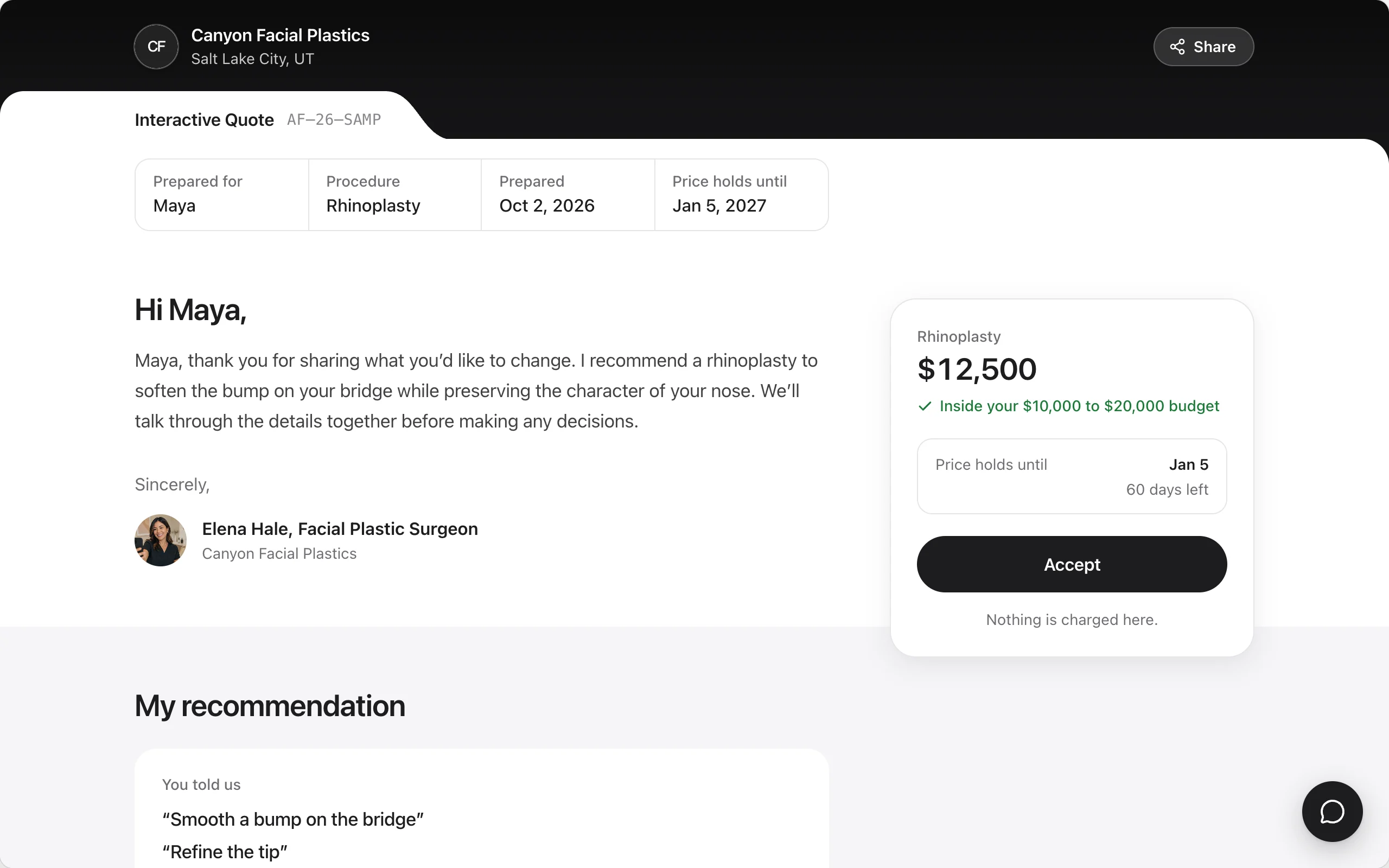
An interactive quote is a page for one patient: a video of you talking through their photos, a letter in your words, one price beside their budget and an Accept button. You record it in your browser, in one take.
Is my follow-up visit included?
Yes! Follow-up care is part of your price.
CFElena HaleVideo for Maya · 4:09
Hi Maya! I looked at your photos. Let’s go through your plan.
Rhinoplasty$12,500AcceptHolds until Jan 5
A sample quote. The practice and surgeon in it are fictional.
Your name is on every quote, so a person at Afters reviews every request before you see it.
Bots, test accounts and duplicates don’t reach you.
Patients agree to every step before they send their plan.
A bad request gets its unlock back when you dispute it within 14 days.
What it costs
Unlocks, explained
You’ve probably paid for leads by the month or by the click. Here’s what practices pay on Afters, and when.
What you do
What it costs
Claim your page and publish results
Free
Read a request’s Preview
Free
Pass on a request
Free
Your first 2 unlocks
Free
Unlock a request after that
A set price for the procedure, shown before you confirm and charged to your card when you unlock
A patient accepts your quote
No extra cost. Their name, phone and email come to you.
You see your own prices when you set up your page.
Your first weeks on Afters
The day you claimYour page becomes yours: your results, your reviews and your team.
Requests that name you come to you.
When a request names youYou get its Preview, free.
What they want, where they ranked you, their budget and their timeline.
When you unlockYou answer with an interactive quote.
The patient sees every quote they asked for together, so a fast, thoughtful one stands out.
From then onEvery result you publish joins the feed.
Awards are rechecked daily, so the ones on your page stay current.
Questions practices ask
Getting started
Why is my practice already on Afters?
Afters lists cosmetic practices so patients can compare real results, and your page started from public information about your practice. Claim it free to edit it, choose which results show and start receiving requests.
Do I need new software?
No. Your page, your requests, your interactive quotes and the video recorder all run in your browser.
Who owns my photos and content?
You do. You give Afters a license to show them on Afters and to promote your listing, and you can take them down whenever you like.
What if something is wrong, or we want the page removed?
Email support@realafters.com. We review every request to correct who a result is credited to, update your details or remove the page, and you don’t need to claim it first.
Pricing
What does it cost?
Nothing to claim your page, publish results or read Previews, and there’s no monthly fee. Your first 2 unlocks are free. After that, you pay only to unlock a request you choose, at a set price you see before you confirm. You see your prices when you set up your page. It’s the same whatever the patient decides, and never a share of what you charge.
How do I pay for an unlock?
We charge the card on file for your account when you unlock, at the price shown before you confirm. Previews and passing cost nothing, and nothing is prepaid. An approved refund goes back to your card.
What if a request isn’t real?
A person at Afters reviews every request for authenticity before it reaches you. If a fake, test, duplicate or unreachable one gets through, dispute it from your Billing page within 14 days and we refund the unlock.
Requests and quotes
What does the free Preview show?
The procedure, where they ranked you among their picks, their timeline, budget range and distance, which photo views they added, and what they want to change, keep and avoid. Never their name, contact details, photos or anything they wrote.
How fast do I need to answer?
You have 24 business hours to unlock or pass, then 48 business hours after unlocking to send your interactive quote. The patient sees every interactive quote together, so a fast, thoughtful one stands out.
How many requests will I get?
That depends on your procedures, your area and your work. Patients find practices through their results, so practices that publish more of their before-and-afters show up in more of the places patients browse.
Your practice is probably already here.
Claim it free, and the next request that names you comes straight to you.